Creating New Listings
To create a new listings click on the + button in the toolbar and select “New eBay Listing”.
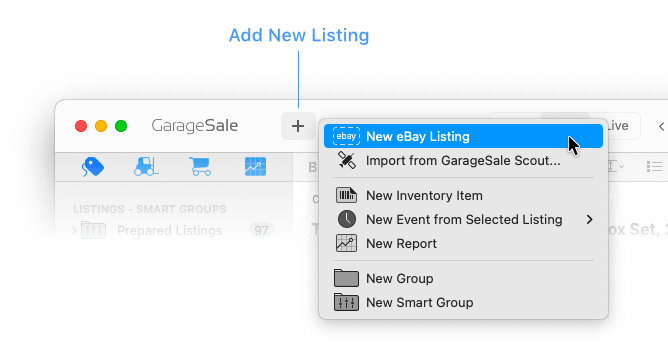
This will create a new listing in the left outline view. Its “prepared” state is represented by a grey icon with a dashed border:

Good to know:
You can define default settings for new listings! This way you don’t have to re-select your default options for each newly created listing again and again. Please see the GarageSale Settings > eBay > New Listings.
Duplicating Existing Listing
You can create a new listing by duplicating a listing that is already present in GarageSale.
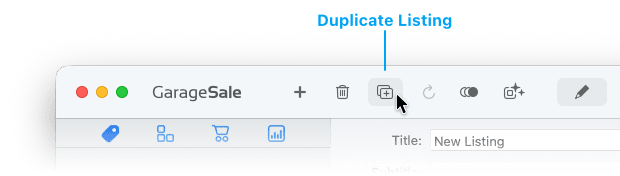
Select an existing listing, then click the duplicate button in the toolbar.
Good to know:
- When holding down the
shiftkey when clicking the duplicate button, images won’t be copied over to the new listing. - When holding down the
controlkey when invoking the “Duplicate” command from the “Edit” menu, you can create an arbitrary number of duplicated listings: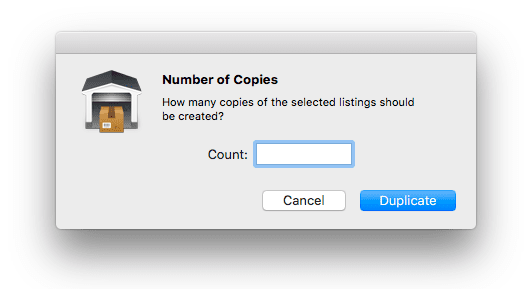
Please note: You can’t duplicate a listing inside a Smart Group. Solution: Select “Reveal Original” from the context menu. You can then create the duplicate from the original item.
Importing Listings
You can import listings from different sources by selecting File > Import >
- Import Listings: Import an exported GarageSale listing, a XML file, or a CSV file
- Import from My eBay: Import listings that you created on eBay
- Import from GarageSale Scout: Import listings you prepared on your iPhone or iPad
- Import from Delicious Library
| << Live Mode | Listing Options >> |