Stopping Listings
Stop Listings Manually
In some cases, you might need to end a listing early. To end a running listing, please highlight the desired listing(s) and click the ••• button in the toolbar and select “Stop Listing…”.
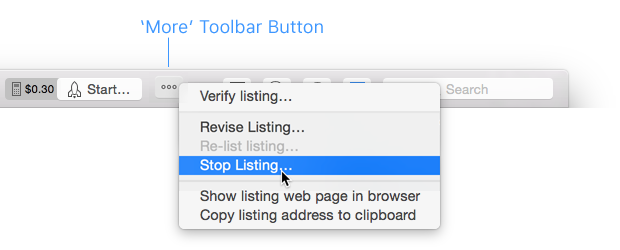
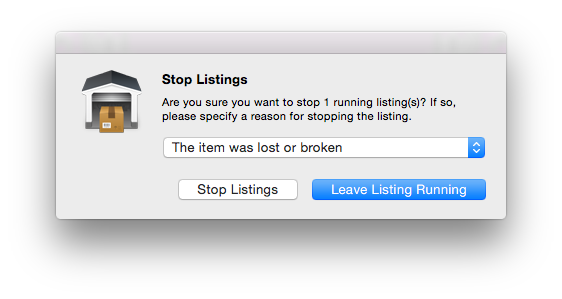
Due to eBay regulations you will need to specify a pertinent reason as to why you want to stop the listing. Select a reason from the drop-down menu and click “Stop Listings” to terminate the listing.
Automatic Cancellation
The auto-cancel feature requires a GarageSale Pro subscription.
When offering items at a fixed-price, you can tell GarageSale to cancel your listings a certain period before eBay automatically renews them.
Please note, that this is an internal GarageSale feature, so GarageSale needs to be running periodically to perform the cancellation.
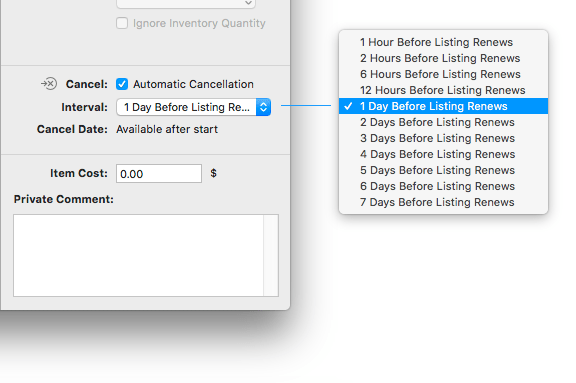
Once activated, an additional icon is shown in the outline view next to the listing. There also are smart group rules that allow you to filter for listings having auto-cancel enabled.
Good to know
- See the GarageSale Settings > eBay > Advanced where you can define how often GarageSale should check the automatic cancellation process.
- Use the
[[item.projectedEndDate]]macro command if you want to include the anticipated end date in your listing’s description. This command anticipates your auto-cancel settings and might let your watchers know that you are planning to end a GTC listing early. Insert it in Editor mode.
| << Relisting Listings | Error Handling >> |