Revising Listings
GarageSale’s “Revise Listings” command is very useful to change live listings on eBay, e.g. when you discover a typo in the description or decide to add another image.
What specific listing properties can be changed depends on various factors, such as the listing style (auction vs. “Buy It Now”-listing), the state of the listing (e.g. number of bids), and the policies on the local eBay site you are targeting.
For instance, ebay will not permit you to change the item description of an auction-style listing once it has received bids. Changing your shipping terms, however, may be fine in the same situation. If the desired changes are not permitted, you will receive an error message from eBay.
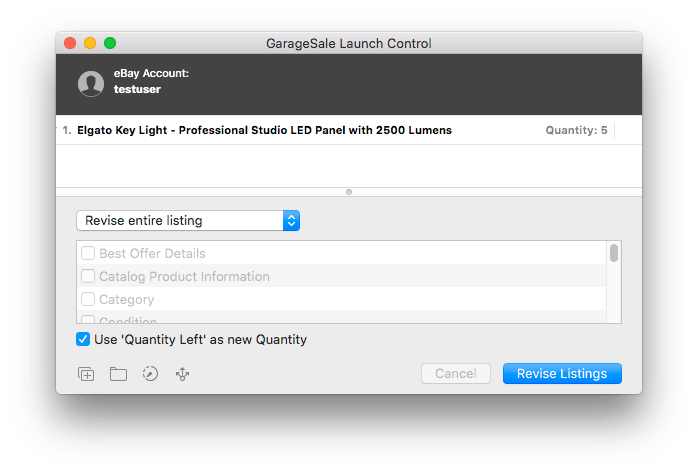
To work around some of these restrictions, you can choose what specific parts of your listing should be changed.
Here is what a typical revision workflow looks like:
1. Apply the desired changes to your active listing in GarageSale.
2. Select “Revise Listings…” from the toolbar:
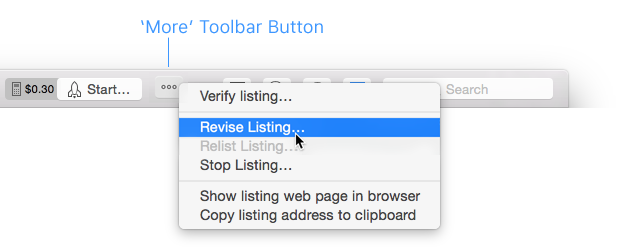
3. Choose “Revise entire listing” or “Revise selected properties only”.
Good to know
- You can revise several listings at once.
- It’s always a good idea to use GarageSale to revise a listing that has been started with GarageSale initially. If you instead revise through the eBay website, these changes are not reflected in the actual listing in GaragaSale.
- Some fundamental properties of your listing such as the listing style (auction vs. BIN listing) can never be altered.
- Depending on the particular listing style and item state eBay may reject your changes and return an error.
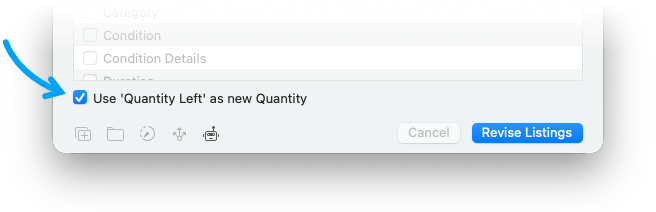
Use ‘Quantity Left’ as new Quantity
The “Use ‘Quantity Left’ as new Quantity” option is helpful if you want to revise multi-item listings. It protects you from accidentally offering a higher quantity than you actually have in stock.
By selecting this option you specify the remaining quantity on eBay as the new listing’s quantity.
Be careful when editing started Listings
GarageSale’s Revise command enables you to make important changes to your live listings. This is particularly useful if you wish to add additional images or seek to modify the listing description.
If however, you wish to start an additional instance of a listing that is already running, please refrain from using the Revise command and duplicate the original listing instead.
Once you start a listing on eBay, GarageSale permanently assigns an eBay item id to the listing. This item id is later used to reference the listing in the Orders and Reports section. Thus, if you were to make changes to the images or item description of an active listing without issuing the Revise command, these sections would end up displaying inconsistent data.
Another compelling reason why you should never make changes to a live listing with the intent of starting an altogether different listing, is the fact that you will no longer be able to make any changes or fix any errors in the original listing. Imagine the following scenario:
Let’s say you just started a listing for an iPhone 5. Since you also own an iPhone 4 that you wish to sell on eBay, you start replacing the images and the item description of the listing originally created for your iPhone 5. A few minutes later it occurs to you that you failed to mention a display crack of your iPhone 5. But since you already removed the original images and item description for the iPhone 5 listing, you are now no longer in a position to easily address the necessary changes.
So, never ever modify your live listings unless you need to revise them.
| << Tracking Listings | Relisting Listings >> |