Importing from eBay
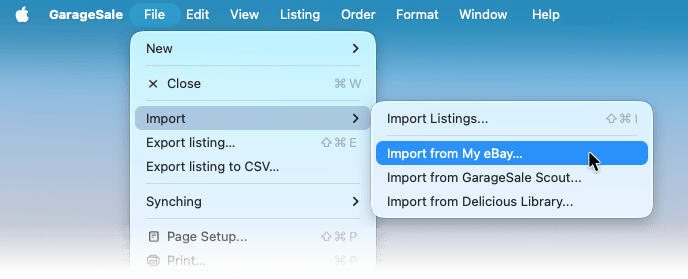
GarageSale can easily import your active and ended listings from eBay. Simply go to File > Import > Import From My eBay.
In the import panel use the checkboxes to select the listings you wish to import.
If you prefer to import all listings, simply hold down the option key and click on any checkbox to select all.
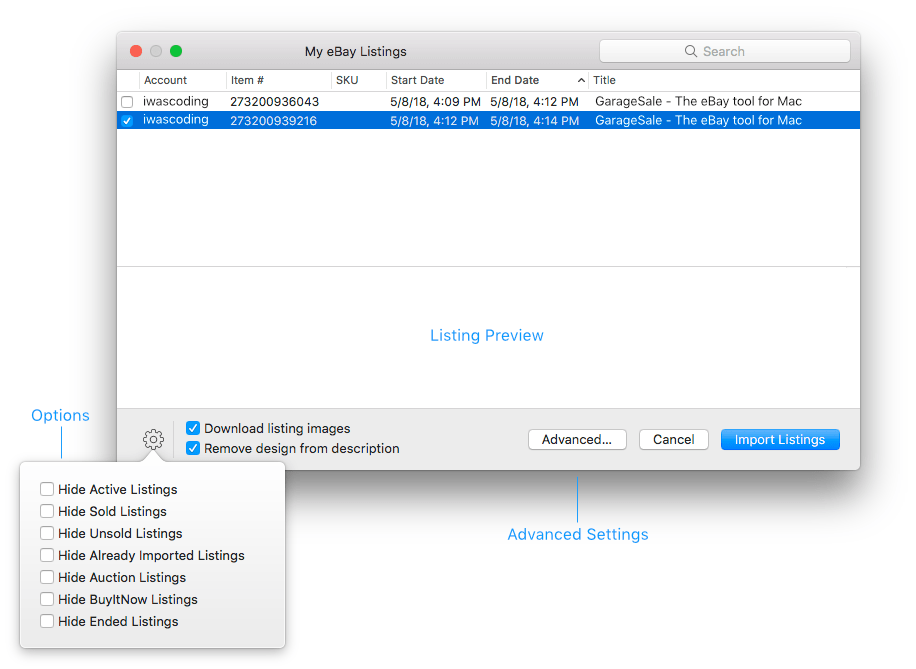
At the bottom of the import window you find several important options:
Download listing images
We recommend selecting the “Download listing images” option. This way the image files will be available in the imported listing and you will be able to re-order or edit them.
If you instead leave that checkbox unchecked, GarageSale will only add the image URLs to your listings. Once the linked images become unavailable, they will disappear from your listings.
Remove design from description
When importing listings from eBay that were started with GarageSale, the whole source code of the item description gets downloaded. This includes the code for e.g. the listing design and the embedded images (image URLs).
With these imported listings, you won’t be able to edit the description, images, design and design properties as you are used to it. Also, if you select a design template, you might end up with a design-within-a-design scenario which looks broken.
Solution: Make sure to select the “Remove design from description” option. It strips the mentioned GarageSale design code from the imported description. As a result you receive a listing you can better work with.
Advanced
Retrieving a complete list of running listings from eBay can take some time, especially if you have a lot of listings on your accounts. You can narrow down what listings to import by specifying filters for data, category and SKU in the “Advanved” settings, thus reducing the wait time significantly.
Good to know
In case the listing already exists in GarageSale and you only want to import it because you made changes to it on the eBay website, you should instead use the “Apply Current Changes from eBay” function from the “Listing” menu.
| << Importing Listings | Importing from CSV >> |