Relisting Listings
The process of restarting an ended listing is called “relisting”. Relisting items can be very useful for two reasons:
- Ended listings that have not received any bids can be relisted without having to pay any additional listing fees. eBay will credit you the listing fee for your original listing after your item has been sold. See here for more info regarding eBay’s relisting feature: eBay Relisting policies
- Relisting fixed price (Buy It Now) items will preserve the Best Match Ranking of the original item. However, you can still loose your Best Match Ranking if you change too many aspects of the original listing. Please see here for more details on Best Match.
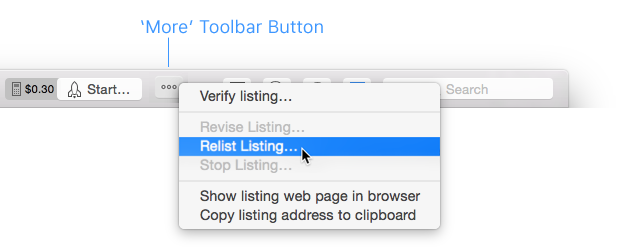
To relist one or more ended listing click on the “More” button in the toolbar and select “Relist Listing…”.
This takes you to the GarageSale Launch Control window.
Here you can select if you want to relist the listing without any changes, with all changes made, or with selected changes only. At the bottom of the panel you find advanced launch control options, e.g. to move the relisted listing to a specific group.
Relist without changes
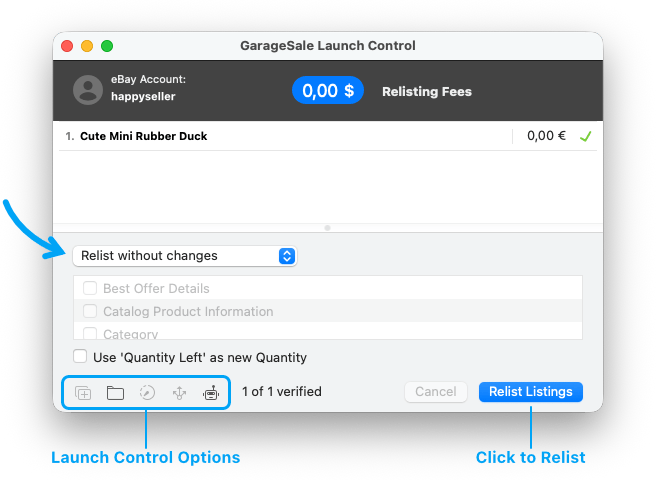
Choose this option to relist the item in its original state without any changes. The item will retain its recent sales history and eBay ranking.
The listing will be re-listed with whatever quantity was left on eBay when the original listing stopped.
Relist with all changes
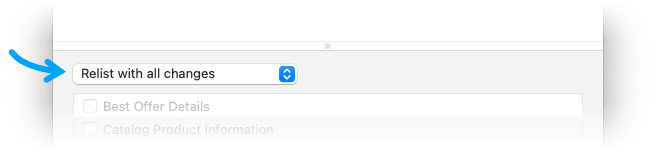
This option allows you to relist the item with all changes you have made to the listing in GarageSale since you initially started or last revised the original listing.
The item will retain its recent sales history and ranking unless you raise the item price or change the listing title.
The re-listed listing will have the quantity that’s currently entered in GarageSale’s quantity field, which probably is the starting quantity of the original listing.
Relist with selected changes
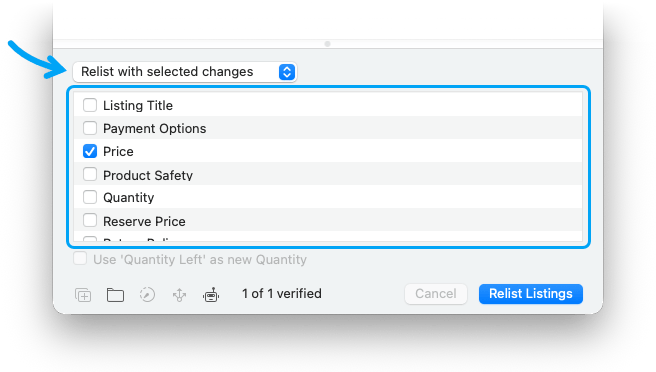
Choose this option to manually select the desired changes from the checkoff list below. The item will retain its recent sales history and ranking unless you raise the item price or change the listing title.
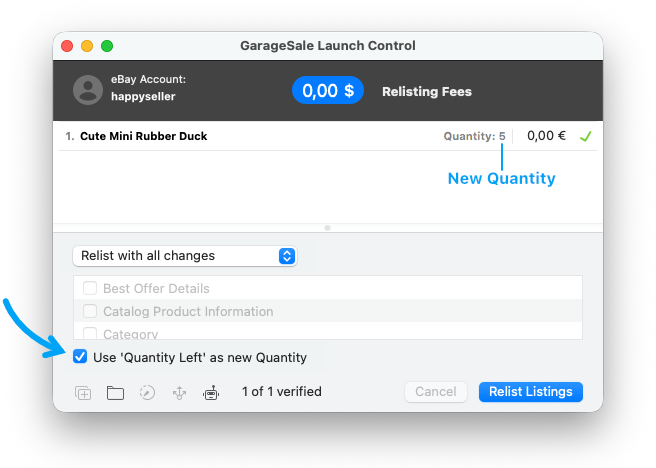
When you relist with the “Quantity” box checked, the re-listed listing will have the quantity that’s currently entered in GarageSale’s quantity field and not the quantity that was left on eBay when the original listing stopped. So keep that in mind when checking the quantity box. You might want to select the Use ‘Quantity Left’ as new Quantity option in this case.
Launch Control Options
-
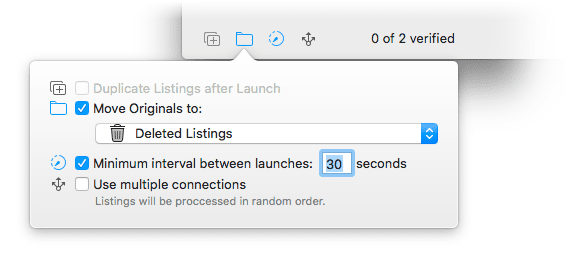
Move Originals to: Here you can tell GarageSale to automatically move the original of your relisted listings to a specific folder (e.g. to the trash). This can be helpful, if you only want to keep the version actually running.
-
Minimum interval between launches: If you relist multiple listings at once you can set an interval between each listing start, e.g. 30 seconds.
-
Use multiple connections: If you relist multiple listings at once you can speed up the launch process by using multiple connections. However, by doing this the listing might be processed in random order.
-
Validate Listings with Script: When relisting listings you can run a custom JavaScript to process the listings. You can create and run scripts from the Show Script Editor Window command in the Windows menu. Learn more in the chapter Custom JavaScript Actions.
If any of these options are enabled, their corresponding status icons will appear highlighted (colored) at the bottom of the Launch Control window.
Use ‘Quantity Left’ as new Quantity
The “Use ‘Quantity Left’ as new Quantity” option is helpful if you want to relist a multi-item listing. It protects you from accidentally offering a higher quantity than you actually have in stock.
By activating this option you specify the remaining quantity on eBay as the new listing’s quantity.
The quantity that GarageSale will upload to eBay for each listing is displayed on the right side of the listing title.
Automatic Restart Feature
GarageSale’s Automatic Restart feature automatically relists ended items. You can enable it for prepared and active listings in the “Advanced” tab of the Inspector sidebar.
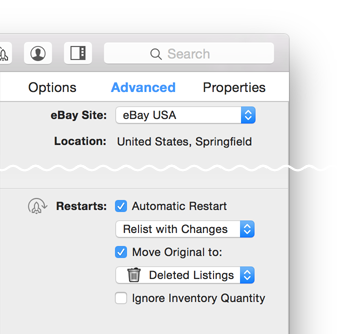
Specify whether you wish to relist the item with changes you made to the listing in GarageSale since you listed the original on eBay or without changes (only required changes to the Image URL inside the Item Description will be made).
-
If there is any quantity left in the ended listing, GarageSale will re-list that listing with the remaining quantity. If all stock of the original listing sold, no re-list will happen.
-
You can specify what happens with the original, ended listings in GarageSale: Select the folder the ended listing should be moved to from the “Move Originals to” popup. For example, if you don’t want to the keep original listing, select the “Deleted Listings” group (trash icon) from this popup.
-
If the listing is linked with an inventory item (SKU), the auto-restart feature is linked to GarageSale’s inventory management and serves as a safeguard to warn you, should you run out of stock.
-
If you enabled the “Ignore Inventory Quantity” option, GarageSale will always relist your ended listing, regardless of the remaining quantity. In this case, GarageSale will re-list with the ended listing’s original quantity.
-
If you stop the listing from within GarageSale, the automatic restart option will be disabled.
| << Revising Listings | Stopping Listings >> |